Most teams do not have a meetings problem. They have a decision problem. The meeting is just where it becomes visible.
Example 4
I killed our weekly status deck. Nobody asked for it back. That told me more than the six months we spent maintaining it.
Operations leadB2B SaaSWriting for founders and COOs
2 of 6 examples retrieved for this topic
Draft, before your edit
Awaiting review
We cut the weekly review from 90 minutes to 35. Not by running it better. By deleting the part where eight people watched one person read a slide.
Qalam shapes the language from what you saved. You verify the facts and decide what leaves the workspace.
Your writing guides each draft
Qalam uses your saved examples and professional context to shape your drafts. You choose the writing it draws from and review the result before publishing.
Keep the workflow
Drafts, versions, reviewer approvals, scheduling, and the archive live in one place instead of five tabs and a spreadsheet.
Separate the clients
Agencies and content teams give each client an isolated workspace with its own voice profile, archive, and approval queue.
How Qalam works
Three steps, and the second one is the whole point.
The difference is what persists. Your role, audience, saved writing examples, hooks, draft versions, schedule, archive, and post analytics stay in one LinkedIn workspace, so each draft is one step in a body of work rather than a standalone output.
01
Set the position
Name the audience you are writing for, the pillars you want to be known for, and the work you can actually defend.
02
Write in your voice
Save the writing you want to sound like, once. Hooks, posts, carousels, and comments then all draft against that same profile, and the most relevant saved examples are pulled into each one.
03
Review before release
Edit the claim, route it to a reviewer if the workspace needs one, and schedule it only when the result still sounds true to you.
Inside Qalam
See the working product before you sign up.
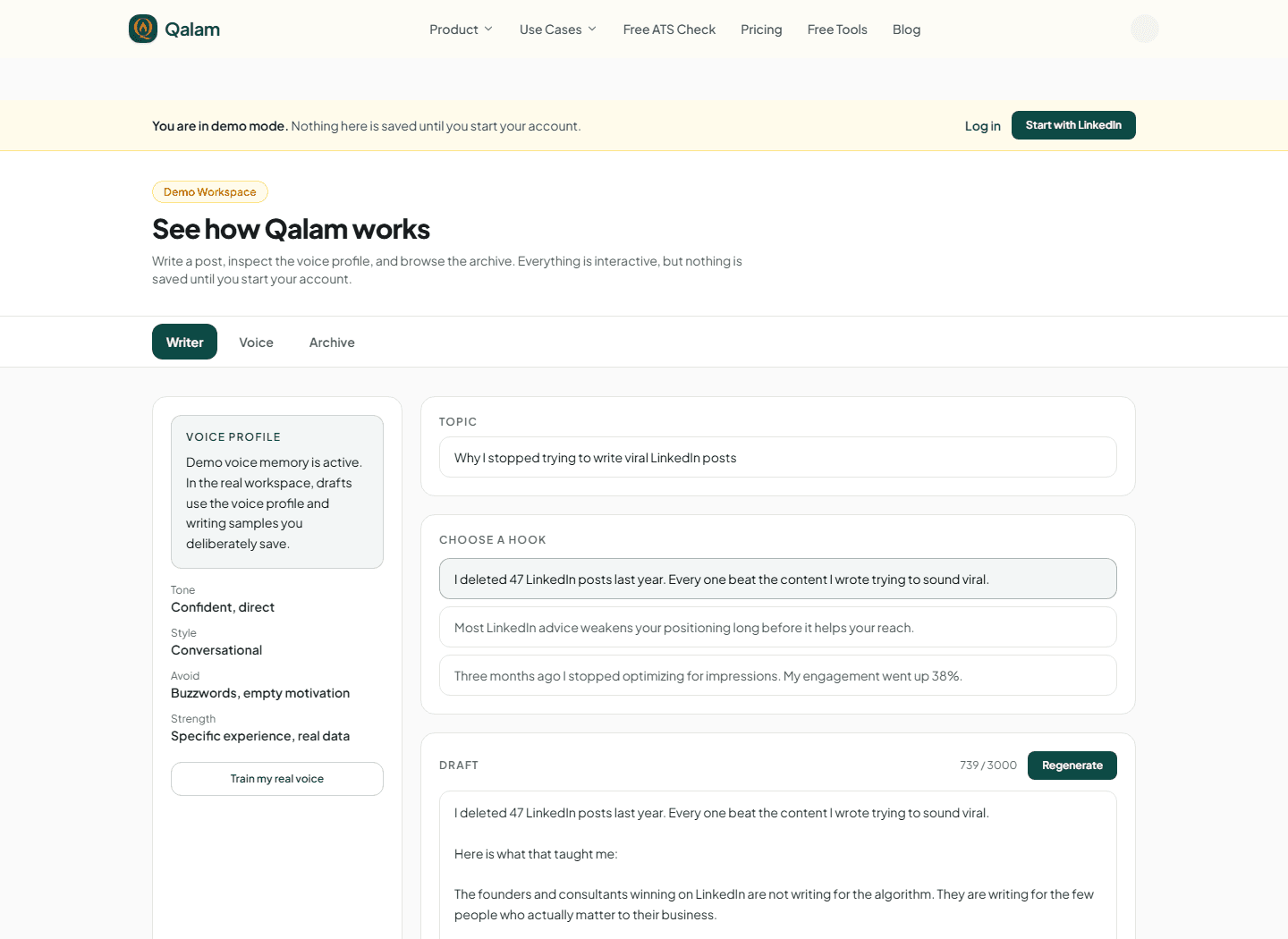
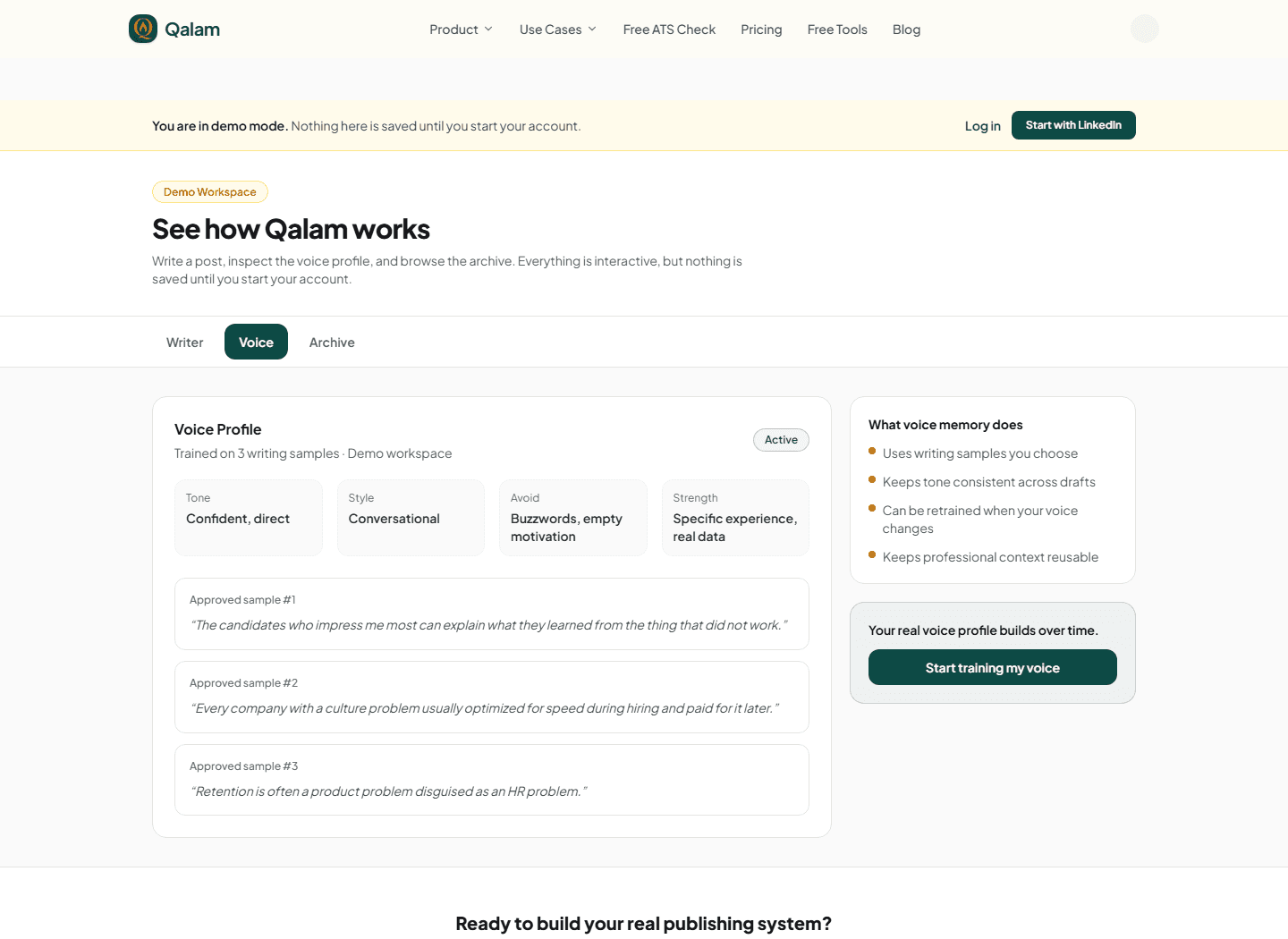
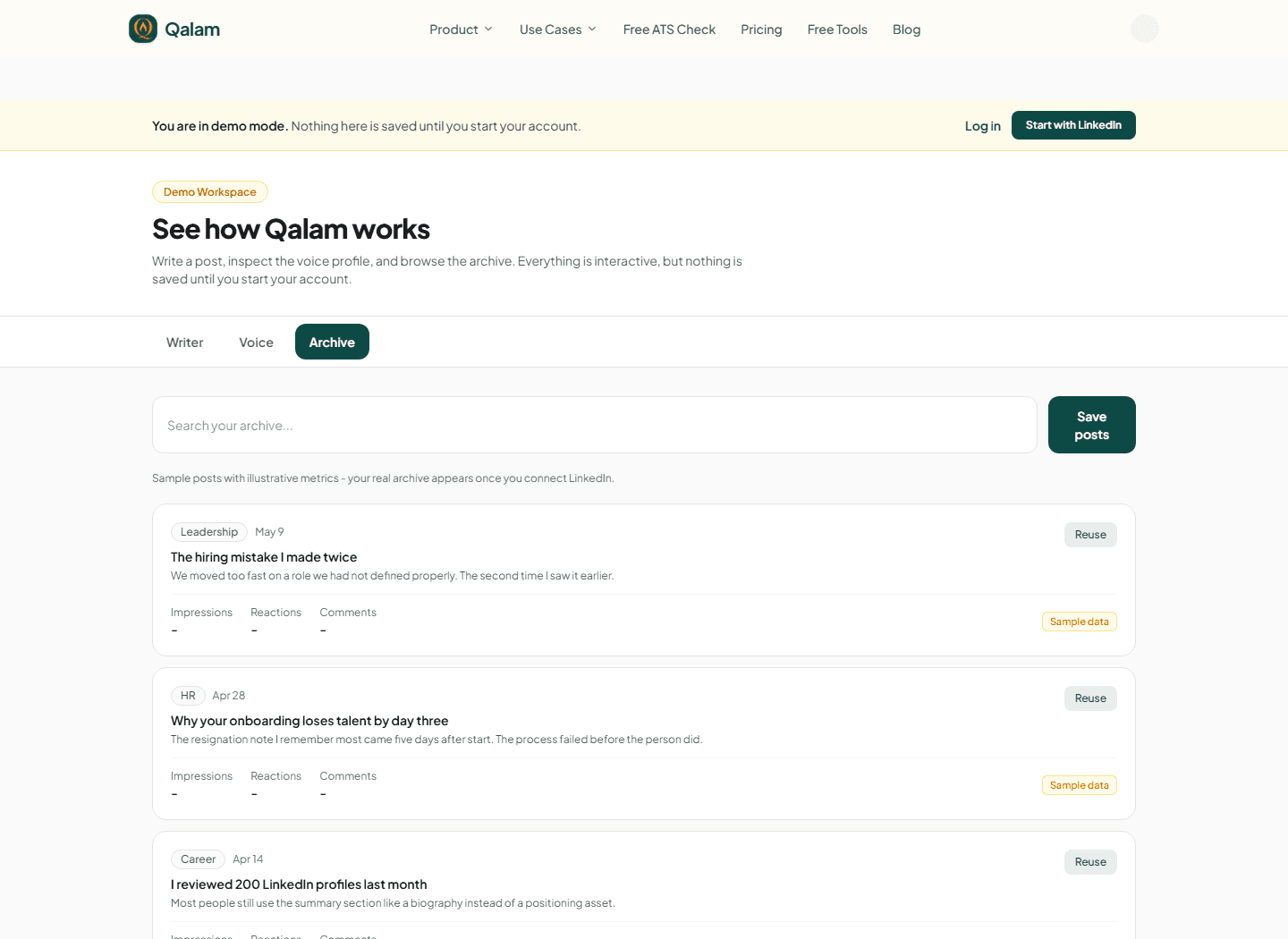
These captures come from Qalam's interactive demo. The interface is real and every example is clearly labelled demo or sample data.
Choose a hook, edit the full draft, and keep the voice context visible while you work.
Interactive demo with sample data
Keep voice context explicit
See what the demo voice profile contains and which sample writing informs the draft.
Interactive demo with sample data
Build a reusable archive
Return to prior ideas and clearly labelled sample records without losing the original context.
Interactive demo with sample data
The refusal
A tool that writes in anybody’s voice is writing in nobody’s.
Qalam is built the narrow way instead. Drafting is grounded in the evidence and examples in your workspace, and nothing reaches LinkedIn without you accepting it first. That constraint is the product, because a post only helps you until someone who knows you reads it.
Voice
It sounds like you or it fails
Your voice profile is built from writing examples you choose to save. Qalam analyses them into tone and structure, then pulls the most relevant ones into each draft. A feature that lifts output but flattens voice does not ship.
Accuracy
No invented achievements
Drafting is grounded in the evidence you supply and every draft requires your review before it goes anywhere. The job is to sharpen a fact you already have, not to fill a gap with something plausible.
Control
Nothing posts by surprise
Publishing and scheduling are actions you take. A scheduled post goes out at the time you set it, and nothing else leaves the workspace on its own.
The archive
One idea, kept. Every format after that is a shorter job.
A point you have already made well is the most underused asset in publishing. Qalam keeps the evidence, the draft, the version history, and the hooks that worked in one searchable place, so the next format starts from something rather than nothing.
Evidence record
“Reduced project review time by 61% while keeping clear owners for every action.”
Source, context, and metric stay attached to the record, so the claim can be checked later rather than remembered vaguely.
01
LinkedIn post
Turn the same lesson into a point of view, drafted through your voice profile.
02
Carousel
Break the same argument into slides, drawing on the draft and evidence already in the archive.
03
Targeted resume
Aim the identical evidence at a job description when you need it. Supporting capability, not the main event.
Applying for roles as well? The free ATS resume check reads a resume the way an applicant tracking system does, no account required.
For agencies and ghostwriters
Every client in their own voice, without the chasing.
Each client gets a separate workspace with its own voice profile, archive, approvals, and analytics. My Desk puts every assigned client in one queue, and the Control Room shows cadence, approval waits, and LinkedIn status with problems sorted to the top.
Connect
Clients connect LinkedIn without sharing a password
Send a private, single-use link. The client approves access on LinkedIn's own page and never needs a Qalam account. Seven days before access lapses, managers are alerted and a client with a contact email on file gets a fresh link.
Approve
Feedback on the exact line, not a vague email
Clients comment on the sentence they want changed. If you agree a no-reply window with a client, they get a heads-up two hours before a draft counts as approved, and it still waits for you to schedule it.
Voice
Rules your team saves, followed on every draft
Voice Passport holds each client's always, never, banned words, and past corrections. Voice Drop emails the client one question they can answer by typing or recording a note.
Retain
Proof reports and pitch previews you can send
Share a private report of posts published through Qalam with their synced LinkedIn metrics, never estimated. Pitch Mode turns a prospect's pasted posts into three sample drafts behind a private link.
Your name and your work stay out of our marketing.
Most people who use Qalam publish under their own name. Some are founders, some write for executives, some run agencies for clients who never want it known that anyone helps them write. So we keep it simple: we never show who our clients are, and we never show whose content was written with Qalam. Not on this site, not in sales calls, not in case studies.
No names, faces, or logos
You will not find a client list here, and you will not hear one from us on a call. That applies to every plan, including free.
We do not point people to your posts
We do not identify your posts as work made with Qalam. If you write for someone else, we keep their name and work out of our marketing too.
Your work is never our example
We do not turn your drafts into case studies, screenshots, or samples for other clients. Every example on this site is labelled demo or sample data.
What we have heard from clients
Clients in Russia, the UK, Canada, Australia, and the US have shared positive feedback with us in conversation. They prefer to keep their identities private, and we respect that.
These conversations were oral, so we are sharing a summary rather than putting words in quotation marks. You can try the demo and judge the writing for yourself.
Want to check the product without taking anyone's word for it? Open the demo
Plans
Start free. Pay when the workflow earns its place.
Three clear levels for exploring, publishing consistently, or building a deeper career operating system.
Free
Free
No payment card
Test the full career visibility loop before paying.
No. We keep your name, face, company logo, and work out of our website, sales calls, and case studies. If you write for clients, the same promise covers their identities and content. You decide what to share about how you work.